
Reload exported WAV into new sample-track in current project

Got a great idea for the future of LMMS? Post it here.
Forum rules

Make sure to search to see if your idea has been posted before! Check our issue tracker as well, just to make sure you are not posting a duplicate: https://github.com/LMMS/lmms/issues

I know this may be far-fetched for now, but it would be great to have someday, if possible:
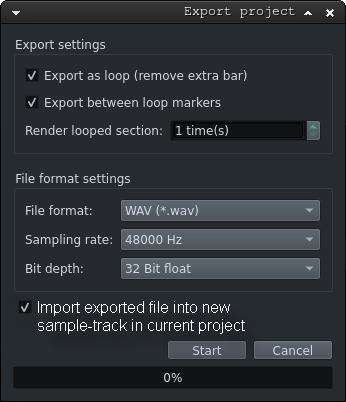
Export project to WAV and reload WAV into it's own new sample-track.


More specifically, to be clear, a feature to add to LMMS's current render to WAV functionality:

  • the ability to automatically load the resultant WAV back into the current project on it's own track/channel as a sample playback WAV item (I forget what it's called in LMMS).

    Currently, LMMS has a nice render to WAV feature which I use all the time. I think it's called "Export Project", (from the "File" menu). I'm thinking that this is the area which could be augmented with with an option to do something similar to...

[_] Add rendered file to new track in (current) project
-OR-
[x] Reload exported WAV into it's own new sample-track in current project

Basically, this would be (if possible) doing what an LMMS user does manually after a render if he/she wanted to load the rendered WAV back into the project. The difference is that LMMS would do it a LOT faster than a human user.

I'm guessing that it might be easier to implement something like that instead of the Energy XT / REAPER style track or item "freeze"/"glue". Specifically, that the render and reload would be easier to implement than item freeze/glue.

Sorry if my explaining this is a bit clumsy, I'm better at composing music than typing concise paragraphs. Anyways, thanks for reading this and thanks for considering. Peace and goodwill to LMMS devs and users (and also to Reaperheads and EnergyXTheads too!)

fake window showing the idea:
Image

If LMMS got this implemented, I think we'd even be earlier than FL Studio for getting this one (I could be wrong?), although REAPER already has it.

mjolnir wrote:
August 21st, 2026, 9:55 pm

Export project to WAV and reload WAV into it's own new sample-track.

That is almost already possible. The only thing you need to do is to save the export into a folder under your Samples-folder, like
Documents/ LMMS/ Samples/ myExportedProjects
This establish that exported wave as a LMMS-sample, and that will now be in the Samples list in sidebar after you press the update-button! You need to do that before it is visible in sidebar!
From here you can just drag in into a Sample-track in song-editor
But remember! It will be HUGE! Aprox 10 MB pr Minute! 😱

Hey, thanks Musikbear, for your reply. I had forgotten about the sidebar and it's drag and drop quickness. You make a good point. I will try and test that out and see how it goes.

As for the file size, that doesn't botter me at all, I'm used to file sizes like that.
In the past, I loaded up similar long tracks as samples and overdubbed some LMMS instruments on neighboring tracks. It worked out okay, but I haven't done it for a long while. I will have to try it out again.

I do feel that the sidebar's drag and drop functionality is one of LMMS's greatest strengths and workflow speed advantages.

Thanks again.

musikbear wrote:
August 22nd, 2026, 3:47 am
mjolnir wrote:
August 21st, 2026, 9:55 pm

Export project to WAV and reload WAV into it's own new sample-track.

That is almost already possible. The only thing you need to do is to save the export into a folder under your Samples-folder, like
Documents/ LMMS/ Samples/ myExportedProjects
This establish that exported wave as a LMMS-sample, and that will now be in the Samples list in sidebar after you press the update-button! You need to do that before it is visible in sidebar!
From here you can just drag in into a Sample-track in song-editor
But remember! It will be HUGE! Aprox 10 MB pr Minute! 😱