Solving No sound/Distorted sound problem
Posted: March 29th, 2011, 5:50 pm
If you don't hear any sound or if you hear distorted sound with LMMS, here's a walkthrough that will maybe solve it. It worked for me.
Follow those steps :
1. Open the run command (Shortcut : Windows key + R).
2. Write "dxdiag" and push "ok" (or press Enter).
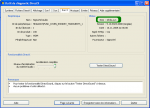
3. A window will appaear. Now click in the "sound 3" tab.
4. Look at the right of the window : there's information about the driver. Look at driver's name and write this name on a paper or keep the window open until walkthrough's end (you will need to write this name back later).
5. Now start LMMS.
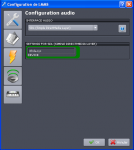
6. Go in the "Edit" tab. Click on "configuration and go in audio configuration.
7. Select SDL (Simple DirectMedia Layer as audio interface.
8. Then, under "settings for SDL", write the driver's name (The name you had to remind about during the step#4.
Then restart your LMMS and check if this worked. If this solved, it's ok. If this is still not solved, come back to the step#3 and try to get driver's name from sound 1 or sound 2 tab instead of sound 3.
I personnaly had that problem and this walkthrough solved my problem.
Follow those steps :
1. Open the run command (Shortcut : Windows key + R).
2. Write "dxdiag" and push "ok" (or press Enter).
3. A window will appaear. Now click in the "sound 3" tab.
4. Look at the right of the window : there's information about the driver. Look at driver's name and write this name on a paper or keep the window open until walkthrough's end (you will need to write this name back later).

5. Now start LMMS.
6. Go in the "Edit" tab. Click on "configuration and go in audio configuration.
7. Select SDL (Simple DirectMedia Layer as audio interface.
8. Then, under "settings for SDL", write the driver's name (The name you had to remind about during the step#4.

Then restart your LMMS and check if this worked. If this solved, it's ok. If this is still not solved, come back to the step#3 and try to get driver's name from sound 1 or sound 2 tab instead of sound 3.
I personnaly had that problem and this walkthrough solved my problem.


 Alot of people should see this Topic. It'll help them alot.