Getting Carla (2.0.95) working with LMMS (1.2.1) [Linux]
Posted: January 9th, 2020, 11:53 pm
'Carla && LMMS
=============
I've been trying to get Carla & LMMS working together on Linux, and read a few threads here on the forum.
One or two said that it worked OK, more said it was a problem, and nothing seemed very recent.
First I tried downloading the prebuilt binaries from kxstudio, but it didn't work and there's no support documentation that I could find, so I gave that up.
But - with a bit of effort - I got LMMS to recognise an installed Carla system by compiling and installing Carla for myself, so I thought I'd drop a note in about it.
These are not comprehensive installation notes, as I can't cover all the variations of Linux distros let alone the huge variation in skills and experience of people using them.
This method worked for me on my computer. For anyone else struggling, they might work for you too.
This isn't difficult and doesn't require specialised expertise, but you'll need to be OK with working in a terminal session, and with downloading and installing packages.
You'll probably also need to know how to execute commands as root (administrator) using "su" or "sudo".
PREREQUISITES
==============
The first thing to say is I am using 64-bit LMMS 1.2.1 as an AppImage, which I got from[b][url]lmms.io/download.[/url]
[/b]
You'll need a development and compilation environment set up, and you'll have to refer to guidance elsewhere for how to do this (sorry).
For instance, in Ubuntu you'll at the very least have to run a terminal command something like
Or, say, if you're running Arch Linux
Different distros will require different things. As I say, I can't cover them all.
A simple bit of googling for "install development files " for your distro will probably find what you need.
Before moving on, follow any instructions for testing that you've got what you need working ok.
To have a[b]fully[/b] configured Carla installed, you might also first need some other packages installed in your system (if it hasn't already got them). These are called "dependencies". & we'll mention this again briefly later.
However, I'm pretty sure that most of what you need to get it running in LMMS will already be available on your system, even if it doesn't have all the "bells & whistles".
Get Carla
=======
Go to[b][url]https://github.com/falkTX/Carla[/url] [/b] and click on "Clone or download", and then select "Download ZIP"; your browser should then offer you a dialogue to download and save the file.
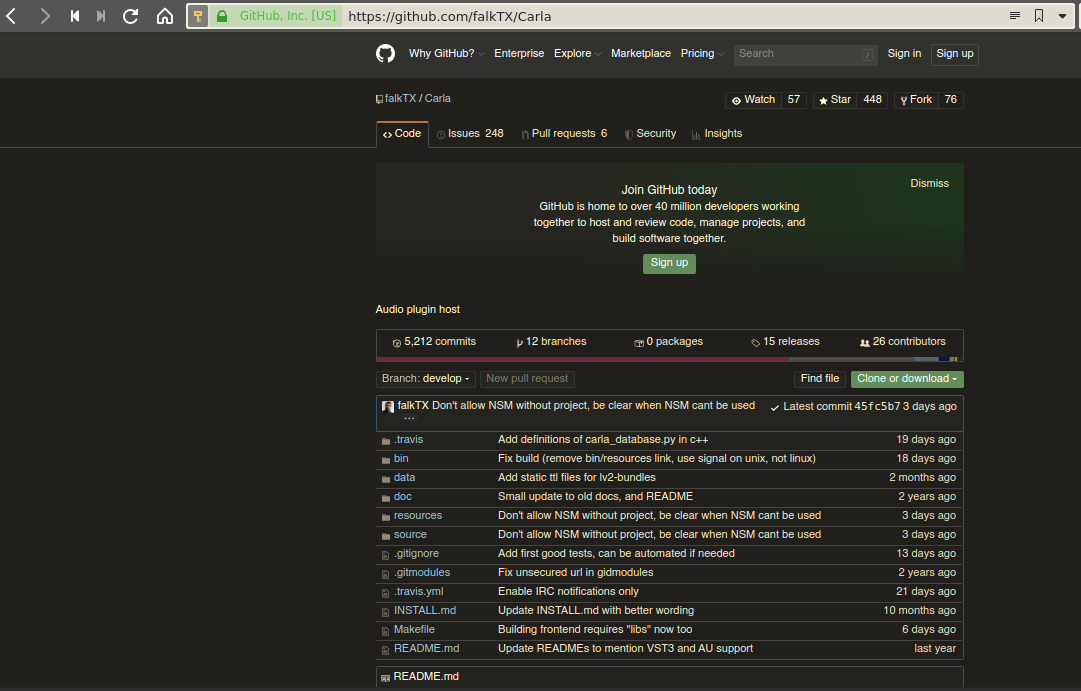
[img]https://ibin.co/58HU26jmlUEZ.png
[/img]
This is the Carla source-code, which we're going to compile and install on our system.
Once the file is downloaded, you'll need to unzip it into a directory (folder) and then open a terminal session and change into the directory into which you just unzipped the source-code.
(If you do a directory listing there ([b][i]ls[/i] [/b] ) you'll see a file called [b]INSTALL.md[/b] , which basically tells you everything I'm going to tell you)
Firstly, try the following command;
You should see output on your screen[b]similar[/b] to the following:
It is not necessary for everything to say "YES", and I'll have to leave it up to you to investigate what else you might need to install before going any further.
So, for instance, on my system[b]OSC Support: NO[/b] showed up along with the message [b]liblo missing[/b]
This meant the system could not find the liblo library development files, which I then had to install.
(I mentioned "dependencies" earlier, and this illustrates that the liblo development files are a dependency of Carla if you need OSC support.)
Compile & Install Carla
==================
Lets assume that you've got all the dependencies you need installed.
When you're ready, you just need to run two further commands in the terminal session, in the directory (folder) where you've unzipped the Carla files.
First you run
(if you know how[i][b][/b] [/i] many cores your processor has, you can speed up the compilation a bit by telling make to use them all; So on my old Dell, I have a Core2 Duo processor with two cores, and I used the command [b]make -j2[/b] ; if I was on my Lenovo with a 4-core I7, I'd have used [b]make -j4[/b] )
You'll then see some output on the screen[i]similar[/i] to this:
(there'll be more than this)
If you see warnings like this, don't worry:
If however, you see actual errors that stop the compile before its completed, you'll need to work out what's wrong & correct the problems before trying again.
(If you need to start over, first run the command
which will tidy up the source directory before you try again)
If the compile completes without error, it doesn't tell you except to say
:)
Next step is to install what you've just compiled:
(for lots of distros you'll probably have to be root for this, so the command will be something like[b]sudo make install[/b] )
You'll see some output[i]similar[/i] to this:
=============
I've been trying to get Carla & LMMS working together on Linux, and read a few threads here on the forum.
One or two said that it worked OK, more said it was a problem, and nothing seemed very recent.
First I tried downloading the prebuilt binaries from kxstudio, but it didn't work and there's no support documentation that I could find, so I gave that up.
But - with a bit of effort - I got LMMS to recognise an installed Carla system by compiling and installing Carla for myself, so I thought I'd drop a note in about it.
These are not comprehensive installation notes, as I can't cover all the variations of Linux distros let alone the huge variation in skills and experience of people using them.
This method worked for me on my computer. For anyone else struggling, they might work for you too.
This isn't difficult and doesn't require specialised expertise, but you'll need to be OK with working in a terminal session, and with downloading and installing packages.
You'll probably also need to know how to execute commands as root (administrator) using "su" or "sudo".
PREREQUISITES
==============
The first thing to say is I am using 64-bit LMMS 1.2.1 as an AppImage, which I got from
You'll need a development and compilation environment set up, and you'll have to refer to guidance elsewhere for how to do this (sorry).
For instance, in Ubuntu you'll at the very least have to run a terminal command something like
[code]sudo apt install build-essential[/code] Or, say, if you're running Arch Linux
[code]pacman -S base-devel[/code] Different distros will require different things. As I say, I can't cover them all.
A simple bit of googling for "install development files " for your distro will probably find what you need.
Before moving on, follow any instructions for testing that you've got what you need working ok.
To have a
However, I'm pretty sure that most of what you need to get it running in LMMS will already be available on your system, even if it doesn't have all the "bells & whistles".
Get Carla
=======
Go to
This is the Carla source-code, which we're going to compile and install on our system.
Once the file is downloaded, you'll need to unzip it into a directory (folder) and then open a terminal session and change into the directory into which you just unzipped the source-code.
(If you do a directory listing there (
Firstly, try the following command;
[code] make features[/code] You should see output on your screen
[code]
        ---> Main features
        Front-End:     YES
        LV2 plugin:    YES
        VST plugin:    YES
        Link support:  YES
        OSC support:   YES
        Binary detect: YES

        ---> Engine drivers
        JACK:        YES
        ALSA:        YES
        PulseAudio:  YES
        CoreAudio:   NO  [MacOS only]
        ASIO:        NO  [Windows only]
        DirectSound: NO  [Windows only]
        WASAPI:      NO  [Windows only]---> Main features
        Front-End:     YES
        LV2 plugin:    YES
        VST plugin:    YES
        Link support:  YES
        OSC support:   YES
        Binary detect: YES

        ---> Engine drivers
        JACK:        YES
        ALSA:        YES
        PulseAudio:  YES
        CoreAudio:   NO  [MacOS only]
        ASIO:        NO  [Windows only]
        DirectSound: NO  [Windows only]
        WASAPI:      NO  [Windows only]

        ---> Plugin formats:
        Internal: YES
        LADSPA:   YES
        DSSI:     YES
        LV2:      YES
        VST:      YES (with UI)

        ---> LV2 UI toolkit support:
        External: YES (direct)
        Gtk2:     YES (bridge)
        Gtk3:     YES (bridge)
        Qt4:      NO  [Qt4 missing]
        Qt5:      YES (bridge)
        X11:      YES (direct+bridge)
        Cocoa:    NO  [MacOS only]
        Windows:  NO  [Windows only]

        ---> File formats:
        Basic: YES
        Extra: YES
        SF2/3: YES
        SFZ:   YES

        ---> Internal plugins:
        Basic Plugins:    YES
        Carla-Patchbay:   YES
        Carla-Rack:       YES
        External Plugins: NO


        ---> Plugin formats:
        Internal: YES
        LADSPA:   YES
        DSSI:     YES
        LV2:      YES
        VST:      YES (with UI)

        ---> LV2 UI toolkit support:
        External: YES (direct)
        Gtk2:     YES (bridge)
        Gtk3:     YES (bridge)
        Qt4:      NO  [Qt4 missing]
        Qt5:      YES (bridge)
        X11:      YES (direct+bridge)
        Cocoa:    NO  [MacOS only]
        Windows:  NO  [Windows only]

        ---> File formats:
        Basic: YES
        Extra: YES
        SF2/3: YES
        SFZ:   YES

        ---> Internal plugins:
        Basic Plugins:    YES
        Carla-Patchbay:   YES
        Carla-Rack:       YES
        External Plugins: NO
        [/code]
It is not necessary for everything to say "YES", and I'll have to leave it up to you to investigate what else you might need to install before going any further.
So, for instance, on my system
This meant the system could not find the liblo library development files, which I then had to install.
(I mentioned "dependencies" earlier, and this illustrates that the liblo development files are a dependency of Carla if you need OSC support.)
Compile & Install Carla
==================
Lets assume that you've got all the dependencies you need installed.
When you're ready, you just need to run two further commands in the terminal session, in the directory (folder) where you've unzipped the Carla files.
First you run
[code]make[/code] (if you know how
You'll then see some output on the screen
[code]
make[1]: Entering directory '/initrd/mnt/dev_save/data/src/Carla/source/backend/engine'
make[1]: Entering directory '/initrd/mnt/dev_save/data/src/Carla/source/backend/plugin'
Compiling CarlaPlugin.cpp
Compiling CarlaEngine.cpp
Compiling CarlaEngineClient.cpp
Compiling CarlaPluginInternal.cpp
Compiling CarlaEngineData.cpp
Compiling CarlaEngineDummy.cpp
Compiling CarlaPluginNative.cpp
Compiling CarlaEngineGraph.cpp
Compiling CarlaPluginBridge.cpp
Compiling CarlaEngineInternal.cpp
Compiling CarlaEnginePorts.cpp
Compiling CarlaPluginLADSPADSSI.cpp
Compiling CarlaEngineThread.cpp
Compiling CarlaEngineOsc.cpp
Compiling CarlaEngineOscHandlers.cpp
Compiling CarlaEngineOscSend.cpp
Compiling CarlaPluginLV2.cpp
Compiling CarlaEngineJack.cpp
Compiling CarlaEngineNative.cpp
Compiling CarlaEngineRtAudio.cpp
Compiling CarlaPluginVST2.cpp
Compiling CarlaEngineNative.cpp (plugin)
Compiling CarlaPluginVST3.cpp
Compiling CarlaPluginAU.cpp
Compiling CarlaPluginJuce.cpp
Compiling CarlaPluginFluidSynth.cpp
Compiling CarlaPluginSFZero.cpp
Creating carla_engine.a
Creating carla_engine_plugin.a
make[1]: Leaving directory '/initrd/mnt/dev_save/data/src/Carla/source/backend/engine'
make[1]: Entering directory '/initrd/mnt/dev_save/data/src/Carla/source/jackbridge'
Compiling JackBridge1.cpp
Compiling CarlaPluginJack.cpp
Compiling JackBridge2.cpp
Creating jackbridge.a
make[1]: Leaving directory '/initrd/mnt/dev_save/data/src/Carla/source/jackbridge'
make[1]: Entering directory '/initrd/mnt/dev_save/data/src/Carla/source/native-plugins'
Compiling _all.c
[/code]
(there'll be more than this)
If you see warnings like this, don't worry:
[code]
ad_ffmpeg.c:115:5: warning: ‘codec’ is deprecated [-Wdeprecated-declarations]
     if (priv->formatContext->streams[i]->codec->codec_type == AVMEDIA_TYPE_AUDIO) {
     ^~
In file included from ffcompat.h:33:0,
                 from ad_ffmpeg.c:29:
/usr/include/libavformat/avformat.h:893:21: note: declared here
     AVCodecContext *codec;
                     ^~~~~
ad_ffmpeg.c:126:3: warning: ‘codec’ is deprecated [-Wdeprecated-declarations]
   priv->codecContext = priv->formatContext->streams[priv->audioStream]->codec;
   ^~~~
In file included from ffcompat.h:33:0,
                 from ad_ffmpeg.c:29:
/usr/include/libavformat/avformat.h:893:21: note: declared here
     AVCodecContext *codec;
[/code]
If however, you see actual errors that stop the compile before its completed, you'll need to work out what's wrong & correct the problems before trying again.
(If you need to start over, first run the command
[code]make distclean[/code] which will tidy up the source directory before you try again)
If the compile completes without error, it doesn't tell you except to say
[code] Done[/code] Next step is to install what you've just compiled:
[code]make install[/code] (for lots of distros you'll probably have to be root for this, so the command will be something like
You'll see some output
[code]
install -d /usr/local/bin
install -d /usr/local/lib/carla/jack
install -d /usr/local/lib/pkgconfig
install -d /usr/local/include/carla/includes
# Create directories (gui)
install -d /usr/local/lib/carla/styles
install -d /usr/local/share/applications
install -d /usr/local/share/icons/hicolor/16x16/apps
install -d /usr/local/share/icons/hicolor/48x48/apps
install -d /usr/local/share/icons/hicolor/128x128/apps
install -d /usr/local/share/icons/hicolor/256x256/apps
install -d /usr/local/share/icons/hicolor/scalable/apps
install -d /usr/local/share/mime/packages
install -d /usr/local/share/carla/resources
install -d /usr/local/share/carla/modgui
install -d /usr/local/share/carla/patchcanvas
install -d /usr/local/share/carla/widgets
# -------------------------------------------------------------------------------------------------------------
# Install script files (non-gui)
install -m 755 \\
    data/carla-single \\
    /usr/local/bin
# Adjust PREFIX value in script files (non-gui)
sed -i -e 's?X-PREFIX-X?/usr/local?' \\
    /usr/local/bin/carla-single
# Install backend libs
install -m 644 \\
    bin/libcarla_*.* \\
    /usr/local/lib/carla
# Install other binaries
install -m 755 \\
    bin