Fading Out

Having trouble with LMMS? Ask about it here.
In real-time playing, there is no problem with this, but when I export (be it to WAV or OGG), it fades out at the end. This sounds just fine if I want to play the music back one time, but it needs to smoothly loop for a project of mine. The fading makes the looping undesirable. I added an incredibly loud note after the piece and this causes the fading to no longer occur, but I must go in and remove the note via a program such as Audacity, which leads to the music looping with a piece of static right where it loops. This, too, is unacceptable. Something notable that happens when both playing back in real time and exporting is that it doesn't stop at the end of the piece, but instead goes a few scores farther. How do I export ONLY what is between the loop points, and without the fading out? Thank you! :D
How do I export ONLY what is between the loop points
Currently not possible
everyting you have in the song-editor will be in the export
, and without the fading out?
whut?
If you have a drop in volume in the end of your project, it is because you have made it. Lmms does not 'auto-fade-out' at project end point
But!
The project will alway end on a bar-end!
That means, that if you have a note, that with just as much as a 1/192 of a note, touches inside a bar, that whole bar will be in the export -as silence!
Make sure you have the last note inside the last bar, and you should have no end-silence at all

Br.
The last note is at the end of the bar and there is still silence. I will share an image.
Image

It exports the three notes, and continues to export the bar after them. What could be causing this?
I went through this problem too. I was trying hard, to post an image on what to do, but I'm not getting through. I hope my written explanation helps.

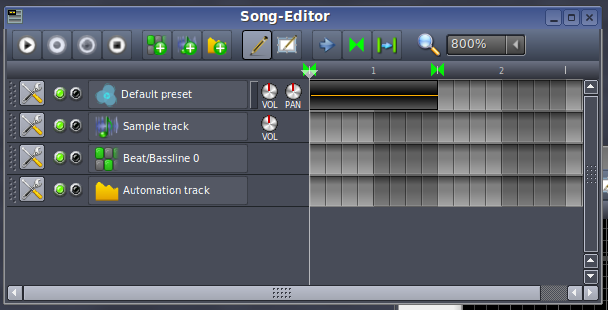
1) Right click one of the arrows on top of the note bars and drag it to the end of your clip. In other words, enclosing it. The "arrows" are located by the "1 to 5 secs in your picture."

2) Press the enclosed bracket icon arrow thingy, "above" the bars where your song is located. "It's the icon in the center." It'll turn "green" and light up the
brackets enclosing your clip in the Song editor.
Your brackets, above your bars will turn green now. Meaning, this is the portion of your song to be exported.

3) Export your song.

The "Fading Out Problem" will be gone.

I hope you understood what I told you. I can't seem to get the picture showing the steps to load in this post. It keeps telling me "Invalid image!" :shock:
Thank you for your response! :D

Do you mean like this?
Image

I tried exporting it like that (one note/score this time), but it still exports all the way to the next score? :?
it does -
glitcht -nothing to do now- il report it
Thank you for taking the time to report this bug, musikbear. Does this mean that there isn't anything I can do to solve this problem besides wait until the glitch is fixed (hopefully in the next release)? Another bug I am having is when I open project files from Version 0.4.5 in Version 0.4.13 (the latest version). I have been using 0.4.5 for my work, but the program crashes whenever I try to open the project files in 0.4.13. I tried this solution on that version as well, hoping the glitch was already found and solved, but it turns out it was not.
tolito wrote:Thank you for your response! :D

Do you mean like this?
Image

I tried exporting it like that (one note/score this time), but it still exports all the way to the next score? :?

Yes! Exactly like that. You did it correct. :D
Wait! You're still getting the "Fading out problem?"
This is weird. Try it again but save it over your previous save. Hope it works.
I agree with musikbear It must be some weird bug.

Note: Sometimes when you try to do things in Lmms, the first, or second time. It strangely behaves in a buggy manner. I don't know why it does that. Then as if by magic, the bug clears out. What a mystery. LOL!!
By the way, may I ask how you're posting these pics on the forum. Some how I keep getting an error, "invalid image." :shock:
I tried it multiple times and it is still happening. It must be a flaw in the source. :?

I got the same error the first and only time I tried attaching an image to a post, so I decided to upload it to PhotoBucket and embed the image into the post instead. ;)
Does this mean that there isn't anything I can do to solve this problem besides wait until the glitch is fixed
Besides manually cutting it out with audacity -yes im' afraid so :/